Setting up Desktop Reminders
You can set up Desktop reminders on the Remember The Milk desktop website. Setting up desktop reminders allows you to receive notifications on your desktop. This makes sure you don't forget what's important to you.
To set up a desktop reminder
-
Log in to your Remember The Milk account.
-
Click Account Settings.
-
Click Reminders.
-
Click Contact Preferences.
-
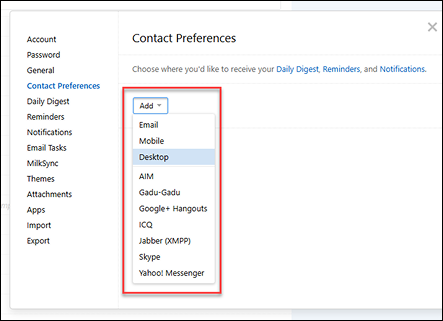
Click the Add dropdown.
-
Click Desktop.
-
Enter the date and time you want to be reminded.
-
Click Add Details.
-
Click the Contact Method drop-down and then click Desktop.
-
Select Save Changes.
A notification confirming your desktop reminder setup displays.
Note: Desktop reminders only display on supported browsers (at least Chrome 20 or Safari 6).
Still need Help?